Storage for ML Systems, Part 1: Choosing the Right Store
A decision framework for picking data stores across an ML system, from training data in object storage to online features under a p99 budget.
Storage for ML Systems: Part 1: Choosing the Right Store · Part 2: Bigtable and Spanner Deep Dives
Most “which database should I use?” debates start from the wrong place: the size of the data, or the brand name of a product. Neither is decisive. A store earns its place in a system because of the queries it must answer, the consistency boundary it must guarantee, and the service-level objective it must hold, not because it is “web scale” or because a competitor uses it.
This two-part series is a decision guide, not a product catalogue. Part 1 lays out the way an ML system actually spreads its data across several stores, the dimensions that separate one store from another, and how to reason about CAP without reducing a database to a two-letter label. Part 2 drills into two systems worth understanding in detail: Bigtable’s row-key model and Spanner’s globally consistent SQL.
One guiding principle runs through everything below:
Choose a store from the access pattern, the consistency boundary, and the latency objective, not from the data’s raw size or a product category alone.
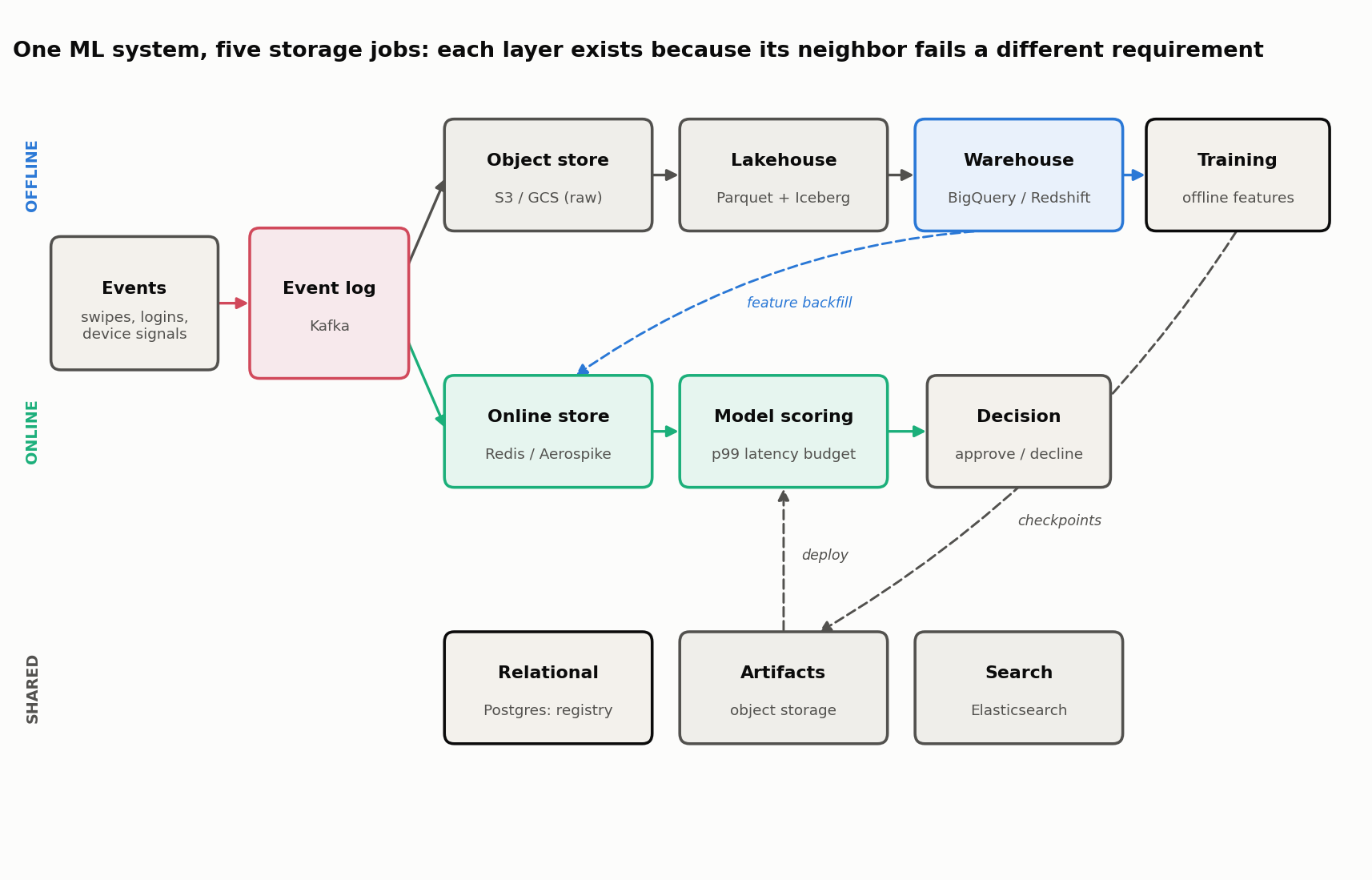
One ML System, Five Storage Jobs
Real ML systems are polyglot for good reasons, not fashion. Consider a real-time fraud-scoring service for a payments platform. Follow one transaction and a single model through their lifecycle, and at least five distinct storage jobs appear, each with incompatible requirements:
- Event transport. Every card swipe, login, and device signal arrives as a stream. A durable, ordered log (Kafka or a managed equivalent) buffers these events so producers and consumers move at their own pace. This is transport, not long-term storage or a query engine.
- Raw and curated history. The full event history lands in object storage (S3, GCS, Azure Blob) as immutable files, then gets organized into columnar files (Parquet) and lakehouse tables (Iceberg, Delta Lake) so that training runs are reproducible and cheap to scan.
- Analytical features and reporting. A warehouse (BigQuery, Redshift, Snowflake) runs the large aggregations that build training features (“average transaction amount per user over 90 days”) and powers analyst dashboards.
- Online features. At scoring time, the model needs a few hundred features for one user within a few milliseconds. A low-latency key-value or wide-column store serves per-entity feature vectors under a strict p99 budget.
- Metadata, artifacts, and search. The model registry, run lineage, and approval state live in a relational database (PostgreSQL). Model binaries and checkpoints live in versioned object storage. Fraud analysts investigate cases through a search index (Elasticsearch), which serves text queries but is never the authoritative record of an account balance.
The important move is to notice why the adjacent store would be a poor substitute. The warehouse that computes a 90-day average in twenty seconds cannot serve one user’s features in five milliseconds. The key-value store that answers a point lookup in a millisecond cannot scan three years of history to train a model. The search index that ranks incident documents must not be trusted to hold the ledger. Each layer exists because the one next to it fails a different requirement.
The Decision Dimensions
Whenever a new store is proposed, evaluate it on the same axes. A single “latency” number or a “best for X” cell hides more than it reveals; the questions below are what actually separate candidates.
| Dimension | Questions to ask |
|---|---|
| Access pattern | Point lookup, range scan, join, aggregation, full-text search, or vector similarity? |
| Write pattern | Append-only, update-heavy, batch load, streaming upsert, or read-modify-write? |
| Transaction boundary | Atomic over one key, one row, one partition, or arbitrary rows and tables? |
| Freshness | Must a write be visible in hours, minutes, seconds, or at request time? |
| Latency objective | The median is not enough. What p95/p99 must hold, at what request rate? |
| Scale | Data volume, request rate, scan volume, and growth rate, separately. |
| Consistency | Strong, read-after-write, bounded-stale, or eventual? |
| Availability | What is allowed to fail, and which operations may be rejected when it does? |
| Retention | TTL, version history, auditability, deletion, and compliance? |
| Operations | Managed or self-hosted; backup, restore, resharding, and observability? |
| Cost | Stored bytes, provisioned compute, per-query scan, network egress, and idle capacity? |
A useful discipline: when someone says a store is “fast” or “scalable,” ask “on which access pattern, at which percentile, under which write load?” The answer usually reveals whether the claim transfers to the workload at hand.
Not a benchmark. Any latency or throughput figure in this series is an order-of-magnitude characterization of a design, not a measurement. Real numbers depend on payload size, topology, hardware, cache state, and the percentile in question. Measure on the target workload before committing.
A Query-First Selection Exercise
The fastest way to internalize the framework is to pick stores from requirements. Four jobs from the fraud system:
1. Fetch 200 features for one user_id under a 10 ms p99 budget. This is a single-entity point lookup on the hot path. A key-value or wide-column online store (Redis, Aerospike, Bigtable, DynamoDB) fits: the entity id is the key, the read touches one partition. A warehouse is rejected outright (its floor is seconds, not milliseconds); a relational primary could hit the latency but would not scale to the request rate cheaply.
2. Scan three years of events to build training features. This is a massive read-only aggregation. Lakehouse tables over object storage (Parquet + Iceberg/Delta) queried by a warehouse or Spark engine fit: columnar layout means a scan reads only the needed columns. An online key-value store is rejected because it cannot scan efficiently and would be ruinously expensive at this volume.
3. Atomically update an account balance and its ledger entry. This needs a multi-row transaction with strict integrity. A relational database (PostgreSQL) or, at global scale, Spanner fits: both give real ACID transactions across rows. Most wide-column and key-value stores are rejected because their atomicity boundary is a single key or row.
4. Search incident documents by text. This is full-text retrieval with ranking. A search index (Elasticsearch/OpenSearch) fits: it builds an inverted index and scores relevance. A relational LIKE '%term%' is rejected because it cannot rank and scans linearly; the search index is a derived serving index, rebuilt from the source of record, not the record itself.
Notice that “how big is the data” never decided any of these. The query shape did.
The Store Families
With the framework in place, here is the corrected taxonomy. The claims are scoped deliberately: behavior depends on version, topology, and configuration, so treat each as “commonly, in a typical deployment” rather than a law.
Relational (OLTP)
PostgreSQL, MySQL. Row-oriented, strict ACID, rich joins and constraints, secondary indexes. The default for core operational state where integrity is paramount: account records, orders, model-registry metadata. Scales up easily; scaling out needs read replicas, sharding, or an extension like Citus. Postgres is unusually extensible (JSONB for semi-structured fields, PostGIS for geospatial). Not built for scanning billions of rows analytically.
Key-Value and In-Memory
Redis, Aerospike, DynamoDB. Optimized for point access by key at very low latency. Redis keeps data in memory (microsecond reads) and, contrary to a common myth, does support atomic multi-key execution through MULTI/EXEC/WATCH and Lua scripts, though without relational rollback semantics, and Redis Cluster constrains multi-key operations to a single hash slot. Aerospike targets sub-millisecond reads on a hybrid RAM/SSD design and can run a namespace in AP mode or a strong-consistency mode. These are the workhorses of the online feature store.
Wide-Column
Cassandra, Bigtable, HBase, ScyllaDB. Built for very high write throughput and horizontal scale, with data modeled as wide, flexible rows grouped by a partition/row key. The atomicity boundary is typically a single row, so schemas are designed so that data needing atomic access lives together. Consistency and indexing capabilities differ sharply across products (Cassandra’s tunable consistency is not HBase’s single-row strong consistency), so they are not interchangeable. Part 2 works through Bigtable’s model in detail.
Columnar Warehouses (OLAP)
BigQuery, Redshift, Snowflake. Store data by column and use massively parallel processing to scan enormous tables. A query like SELECT AVG(amount) ... GROUP BY day reads only the columns it touches, which is what makes analytical scans cheap. These are the engines for training-feature generation and BI, not for live per-request lookups. Cost and latency depend heavily on bytes scanned, partitioning, caching, and the capacity/reservation model, so a flat “seconds to minutes” label is misleading.
Document and Search
MongoDB (document), Elasticsearch/OpenSearch (search). MongoDB stores flexible JSON-like documents with multi-document ACID transactions available since v4.0, good for evolving schemas and catalogues. Elasticsearch builds an inverted index (Lucene) for full-text search and log analytics; it is best understood as a derived serving index, optimized for search rather than as a system of record. Modern Elasticsearch uses quorum-based master election, so the old blanket “split-brain” warning is outdated; the property that still matters is that a write becomes searchable only after a refresh (near-real-time), and durability/query semantics differ from a transactional database.
Object Storage and Lakehouse Tables
S3, GCS, Azure Blob, plus table formats Iceberg, Delta Lake, Hudi. Object storage is the cheap, durable, effectively unlimited foundation for raw data, columnar files, and model artifacts. On its own it is just files; lakehouse table formats add schema, ACID commits, time travel, and efficient partition pruning on top, turning a bucket of Parquet into queryable, versioned tables. This layer is where reproducible training data and model checkpoints live.
Event Log
Kafka (and Pulsar, Kinesis). A durable, ordered, replayable log. It is a transport and integration backbone, not a database and not long-term queryable storage: it moves events between producers and consumers and feeds downstream stores. Its durability and availability are configuration-dependent (acks, replication.factor, min.insync.replicas, and leader-election policy), which is why a single CAP label does not fit it. Downstream databases and object stores are still required for querying and long-term retention.
Columnar Files versus Wide-Column Databases
These two get confused because both say “column,” but they solve opposite problems.
Columnar storage (BigQuery, Redshift, Snowflake, Parquet files) lays data out by attribute: every amount value sits next to every other amount value on disk. That layout makes analytical scans cheap, because a query aggregating one column reads only that column and skips the rest. It is optimized for read-heavy OLAP over structured data with a fixed schema.
Wide-column stores (Cassandra, Bigtable, HBase) lay data out by row, but each row can hold a huge and flexible set of columns. They are optimized for high-throughput writes and fast key-based lookups at horizontal scale, an OLTP-style operational workload. The name refers to the flexible row shape, not to on-disk column grouping.
| Feature | Columnar Storage | Wide-Column Stores |
|---|---|---|
| Primary goal | Analytics (OLAP) | Scalable operational reads/writes (OLTP) |
| Data layout | By column (all amount values adjacent) | By row (rows are wide and flexible) |
| Optimized for | Read I/O: touch only the needed columns | Write throughput and horizontal partitioning |
| Typical query | SELECT SUM(amount) GROUP BY month | GET row WHERE key = 'user#123' |
| Scale story | Cheap large scans | Linear scale, predictable low-latency key lookups |
| Examples | BigQuery, Redshift, Snowflake, Parquet | Cassandra, Bigtable, HBase, ScyllaDB |
The clean mental model: columnar is for scanning many rows over few columns; wide-column is for fetching few rows by key. OLTP and OLAP name these two workloads, and while OLTP commonly pairs with row/wide-column stores and OLAP with columnar ones, the pairing is a tendency, not a definition.
CAP Without Product-Label Shortcuts
The most abused idea in storage is the CAP theorem, usually reduced to slapping “CP” or “AP” on a product name. That is not what CAP says.
CAP is about what a replicated distributed system does during a network partition: when nodes cannot all communicate, a system cannot simultaneously guarantee linearizable consistency and a successful response from every non-failing node. It has to give up one. Outside a partition there is no CAP trade-off at all, which is why labeling a single-node PostgreSQL “CA” is meaningless: with one node there is no partition to trade over.
Two consequences follow. First, the trade-off belongs to a deployment and configuration, not a product name: topology, consistency level, acknowledgment policy, and routing all move it. The same product can behave differently under different settings. Second, CAP only speaks to partitions; the rest of the time, distributed systems still trade latency against consistency. That extension is PACELC: if Partitioned, choose between Availability and Consistency; Else, choose between Latency and Consistency. PACELC captures the everyday cost that CAP ignores.
So instead of a product-to-letter table, describe behavior:
| Deployment | Consistency guarantee | Behavior during a partition | Knobs that move it |
|---|---|---|---|
| Single-node Postgres | Strong (one copy) | No replicated partition to trade over; the node is simply up or down | Add replicas/failover to enter CAP territory |
| Postgres primary + sync replica | Strong on commit | Minority side rejects writes to avoid divergence | Sync vs async replication; failover policy |
| Cassandra, quorum reads+writes | Tunable (strong at quorum) | Stays available at lower consistency levels; may serve stale reads | Consistency level per query; replication factor |
| Bigtable, single cluster | Strong | Unavailable if the cluster is unreachable | Multi-cluster routing changes this (see Part 2) |
Kafka, acks=all + min.insync.replicas=2 | Durable once acknowledged | Rejects writes if too few in-sync replicas remain | acks, min.insync.replicas, unclean-leader policy |
The lesson is that “what happens when a replica is unreachable, and can an acknowledged write still be lost or a read still be stale?” is a far more useful question than a static CP/AP label.
A Selection Matrix and Anti-Patterns
Pulling it together for the fraud system’s five jobs:
| Job | Access pattern | Store class | Why not the neighbor |
|---|---|---|---|
| Event transport | Ordered append + replay | Event log (Kafka) | A database is not a replayable transport; an object store is not low-latency streaming |
| Training history | Large columnar scan | Object store + lakehouse (Parquet/Iceberg) | A key-value store cannot scan cheaply |
| Offline features / BI | Aggregation over billions of rows | Warehouse (BigQuery/Redshift) | An OLTP database chokes on full scans |
| Online features | Point lookup, tight p99 | Key-value / wide-column (Redis/Aerospike/Bigtable) | A warehouse’s floor is seconds |
| Registry + artifacts | Transactional metadata + big blobs | Relational (Postgres) + object storage | A search index is not a source of record |
A few recurring anti-patterns to avoid:
- Treating a search index as a system of record. Elasticsearch is a derived index; rebuild it from the source, do not trust it as the ledger.
- Using a warehouse on the request path. OLAP engines are built for throughput, not single-request latency.
- Forcing analytics onto an OLTP database. Full scans on a row store compete with, and starve, the transactional workload.
- Reasoning about CAP from product names. Always tie the trade-off to topology and configuration.
Storage is an access-pattern decision, and an ML system needs several stores precisely because it runs several access patterns at once. Part 2: Bigtable and Spanner Deep Dives takes two of these systems apart: how Bigtable’s lexicographic row keys drive every design choice, and how Spanner delivers strongly consistent SQL across the globe without pretending to escape CAP.
Resources
- Gilbert, S. & Lynch, N. (2002). Brewer’s Conjecture and the Feasibility of Consistent, Available, Partition-Tolerant Web Services. ACM SIGACT News, 33(2), 51-59.
- Abadi, D. (2012). Consistency Tradeoffs in Modern Distributed Database System Design (PACELC). IEEE Computer, 45(2), 37-42.
- Redis transactions and Aerospike consistency modes.
- Apache Iceberg and Delta Lake table-format documentation.