Introduction to AdTech: The Millisecond Handshake - Ad Tags, Pixels, and the Redirect Loop
In the previous posts, we explored who participates in the AdTech ecosystem and how the supply and demand stacks are structured. In this post, we shift focus to how those systems actually talk to each other in real time.
This article breaks down the low-level mechanics that make digital advertising possible: Ad Tags, Redirects between ad servers, and Tracking Pixels. Together, these form the millisecond-level handshake that allows a browser to coordinate multiple globally distributed systems - publishers, advertisers, and measurement platforms, before a single ad slot finishes rendering.
Understanding this “plumbing” is critical because:
- It explains how trust is enforced between publishers and advertisers.
- It shows why browsers sit at the center of the entire system.
- It reveals how delivery, measurement and attribution are decoupled by design.
Once these mechanics are clear, the more advanced topics - like bidding strategies, user identity, and machine-learning-driven optimization become much easier to reason about. This post provides the foundation for everything that follows.
1. The Ad Tag: The Browser’s Instruction Manual
An ad tag is not the ad itself. It is a snippet of code (usually JavaScript) that acts as a set of instructions for the user’s browser. Think of it as a recipe that tells the browser exactly where to go and what to do to fetch the actual ad.
The Scenario
- Who: Priya, a user in Bengaluru.
- Where: She navigates to ESPNCricinfo.com to check the latest scores on Women’s World Cup cricket tournament.
- The Goal: Nike wants to show Priya their new Indian Cricket Team jersey.
The Step-by-Step Journey
- The Encounter: As Priya’s browser downloads the HTML source code, it finds a
<script>tag embedded in a<div>for the main banner slot:
1
2
3
4
5
6
7
8
<div id='homepage-top-banner'>
  <script>
    googletag.cmd.push(function() {
      googletag.display('homepage-top-banner');
    });
  </script>
</div>
The Instruction: The
googletag.display(...)call does not halt the browser or block the page. It registers and displays the slot through the Google Publisher Tag (GPT) command queue (googletag.cmd.push), which runs asynchronously once the GPT library has loaded. Whether it triggers its own network call depends on configuration: under GPT’s single-request architecture, many slots on the page are batched into one ad request; slots can also be lazy-loaded as they approach the viewport, refreshed on a timer, or gated behind a consent check before any advertising call fires at all.The First Call: Once a request is issued, it goes to the Publisher’s Ad Server (e.g., Google Ad Manager). This request carries critical metadata: the Ad Unit ID, the Website URL, Priya’s IP address (which every contacted endpoint sees at the network layer), and her browser/user-agent.
At this point, the browser knows which slot needs an ad - but not yet where the ad will ultimately come from.
2. The Redirect Loop: Passing the Baton
One common pattern in AdTech is the dual-server chained fetch. To support independent measurement, the publisher-side and advertiser-side ad servers each observe the event, so neither has to blindly trust the other’s numbers. The chained fetch below is one winning-response shape; it is not how every impression is delivered (we list the alternatives right after).
The Decision: The publisher-side ad server receives the request and decides that Nike’s campaign is the best match for Priya.
The Handoff: Crucially, the publisher-side server does not send the Nike image directly to Priya’s browser. Instead, it returns another piece of markup - Nike’s own ad tag. This is not an HTTP 302 redirect; it is ad markup that instructs the browser to make the next call itself.
The Second Call: Priya’s browser reads that markup and makes a second network request, this time to Nike’s advertiser-side ad server (e.g., Campaign Manager 360).
Frequency Rules and Creative: Nike’s server checks its internal rules (like Frequency Capping, e.g. “don’t show this to Priya more than 3 times today”) and returns the creative file (
Nike_Jersey_Ad.jpg). Note the careful wording: this call lets Nike log that a creative was requested, which is not the same as proof it was rendered or seen - a distinction we sharpen in a moment.The Render: The browser receives the image and renders it inside the banner
<div>.
This chain is one branch, not the architecture of every impression. The winning response could instead be a publisher-hosted creative served directly, a third-party ad-server tag, VAST markup for a video ad, native assets assembled by the page, or a creative fetched from a CDN alongside separate measurement URLs - and modern creatives are usually isolated inside a sandboxed iframe / SafeFrame rather than injected raw into the page.
One delivery is really several distinct events
The phrase “an ad was served” hides a sequence of milestones that measurement and billing treat very differently. It is worth separating them explicitly:
- Ad request - the browser asks for an ad.
- Ad selection / bid response - a winner is chosen.
- Creative response - the creative markup or file comes back.
- Render - the browser actually paints it.
- Measurable impression - the render is countable by an agreed rule.
- Viewable impression - e.g. ≥50% of pixels on screen for ≥1 second.
- Click - the user interacts.
- Conversion - a later outcome, often on a different site.
A request logged at step 3 does not prove step 4, let alone step 6. This gap between requested, rendered, and viewable is exactly why an entire industry of viewability and verification vendors exists, and why two honest logs disagree.
Putting the delivery sequence on one timeline makes the article’s title concept concrete. Notice that no central server runs this show: the browser issues every call in turn, hopping between independently operated servers and stitching them into a single rendered ad in tens of milliseconds.
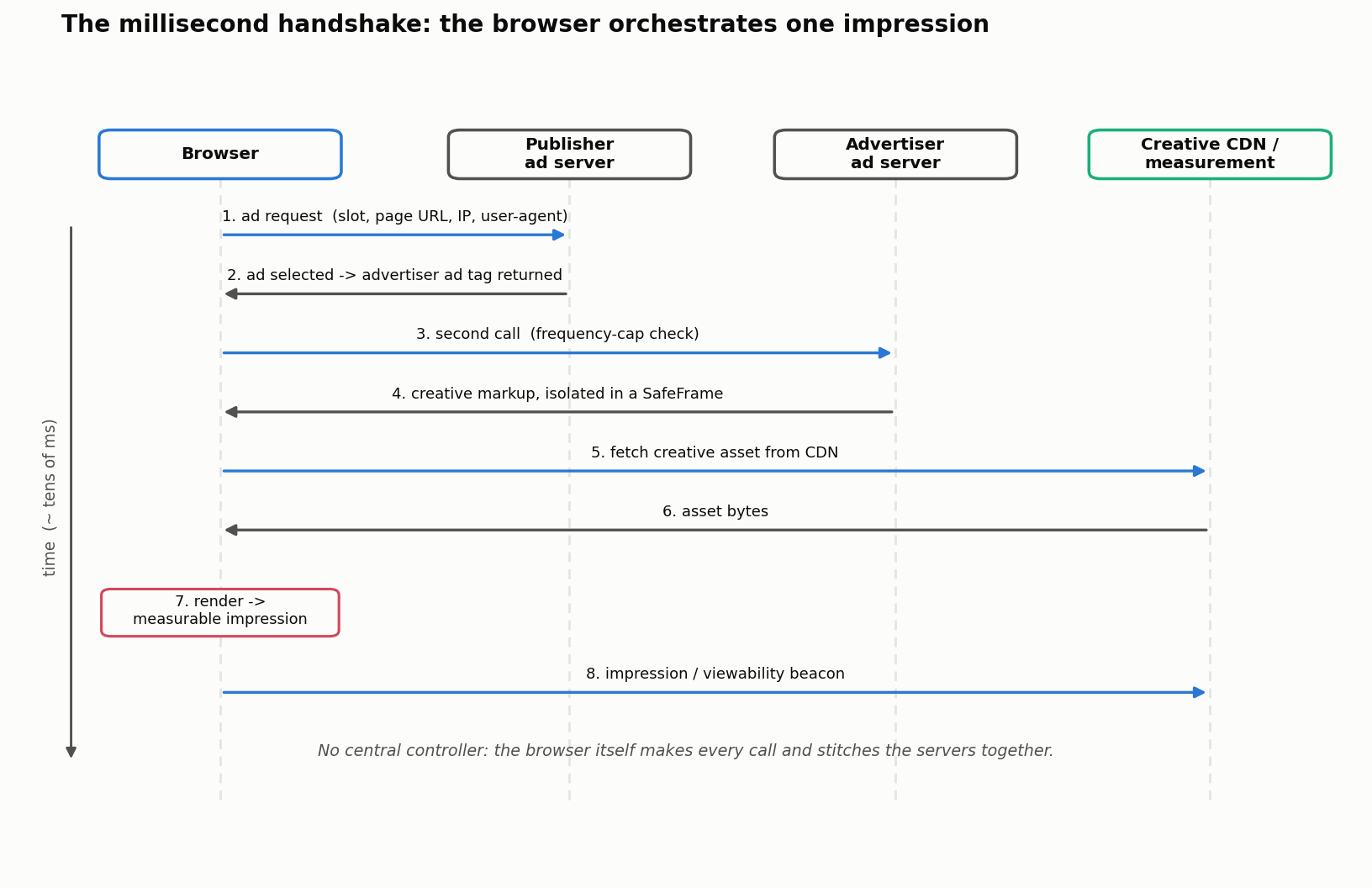
Delivering an ad is only half the story. The system also needs to know whether that delivery actually mattered.
3. The Tracking Pixel: Closing the Feedback Loop
While the Ad Tag is about Delivery (the “For Rent” sign in the window), the Tracking Pixel is about Measurement (the invisible security camera counting how many people entered the store). They are two sides of the same coin, marking the beginning and end of a user’s advertising journey. The camera analogy is deliberate and a little uncomfortable: measurement here really is a form of surveillance of behavior, and keeping that framing honest is part of understanding the system rather than just admiring its cleverness.
The Mechanism
A tracking pixel is a tiny, invisible 1x1 pixel image placed on pages that signify an event, such as an “Order Confirmed” page. It acts as an invisible tripwire.
- Awareness (Ad Tag): A user in Bengaluru is browsing ESPNCricinfo.com. An ad tag fires and delivers an ad of a Nike jersey for the Indian Women’s Cricket Team.
- Consideration (Pixel): The user clicks the ad and browses the jersey product page on Nike’s website. A
ViewContenttracking pixel fires, recording that this browser reached the product page. - Conversion (Pixel): The user buys the jersey. She lands on the “Order Confirmed” page. A
Purchasetracking pixel fires, recording an outcome event that can be matched to a prior eligible ad interaction.
In short: the ad tag delivers the message, and the tracking pixel records a later event that may be attributed to it. Crucially, “attributed” is not “caused”: matching a purchase to an earlier click or view under an attribution rule does not prove the ad made the purchase happen - Priya might have bought the jersey regardless. Genuine causal lift needs a holdout or experiment, which a later article covers.
Example: The Purchase Confirmation
When Priya buys the jersey, the browser tries to load a simple <img> tag from the advertiser’s measurement endpoint (the markup below is synthetic - a made-up example domain, not a real Nike endpoint):
1
2
<img height="1" width="1" style="display:none;"
src="https://measure.example/pixel?event=Purchase&order=synthetic" />
What happens technically:
- The browser makes a simple GET request to the URL in the
srcattribute, automatically attaching any cookies scoped to that endpoint’s domain (not, as we will see, every cookie the advertiser owns). - The server reads the parameters and logs the event.
- Under an attribution rule, it may match this event to a prior eligible ad interaction for this browser.
- The server returns the invisible 1x1 image to complete the request.
A practical caution the original pattern glosses over: putting a real order value or personal data in a plaintext GET query string (
?value=2499.00) is poor practice - query strings land in logs, referrers, and browser history. Production systems favor server-to-server postbacks or signed, minimal payloads. Treat the snippet above as an illustration of the mechanism, not a template to copy.
Because the conversion happens on a different page, often days later, it is a genuinely separate event from the render - not the last step of one render chain. A more honest picture has two moments in time:
1
2
3
4
5
6
Day 1  (ESPNCricinfo)         Day 3  (nike.com)
  Browser                       Browser
   -> Publisher ad server         -> loads confirmation page
   -> Advertiser ad server        -> Purchase pixel fires
   -> Creative (SafeFrame)        -> event matched under an
   -> render + impression            attribution rule (maybe)
Redirects and pixels may look archaic, but they survive because they are simple, scalable, and browser-native. Note they are not stateless in the privacy sense: these very requests carry identifiers - cookies and URL parameters - which is precisely what lets separate events be stitched together.
4. Cookies: Tying the Thread Across Time and Space
So far, everything we’ve described happens within a single page load. But advertising doesn’t care only about this moment - it cares about history.
To connect the Awareness event (an ad tag firing on Site A today) with the Conversion event (a tracking pixel firing on Site B tomorrow), the system needs a way to recognize that the same browser was involved in both.
This is where cookies enter the picture.
What Problem Cookies Actually Solve
At a technical level, cookies answer one simple question:
“Have I seen this browser before?”
They provide a persistent, browser-scoped identifier that survives:
- page refreshes
- navigation across websites
- and time gaps between sessions.
Without cookies, every ad impression and pixel fire would look like a brand-new, unrelated event.
How Cookies Fit into the Flow We’ve Already Seen
Let’s extend Priya’s journey:
Day 1 - Awareness
Priya visits ESPNCricinfo.com. When Nike’s ad tag is executed via the redirect loop, Nike’s ad server responds with:
- the ad creative, and
- a small instruction to store a cookie in Priya’s browser (e.g.,
nike_id=abc123).
From this point on, Nike can recognize this browser whenever it encounters that cookie again.
Day 3 - Conversion
Priya visits Nike’s website directly and buys the jersey. On the confirmation page, the tracking pixel fires. Along with the
Purchaserequest, the browser attaches the cookies scoped to that request’s destination - matching host/domain and path, honoringSameSite,Secure, partitioning, and expiry - which may includenike_id=abc123if it was set for that scope. It does not blindly send every cookie Nike has ever set; cookie scoping is precise, not a free-for-all.If the identifiers line up, Nike’s system can connect:
“The browser that saw the ad on ESPNCricinfo is the same browser that just purchased.”
Two cautions keep this honest. First, “the same browser” is not “the same person” - a shared or reset device breaks the equivalence. Second, the if is doing real work: the identifier that Nike’s advertiser-side ad server saw on ESPNcricinfo (a cross-site context) is not automatically the same as the first-party nike.com cookie set when Priya visits Nike directly. Joining those two often requires extra machinery - redirect-based cookie syncing, link decoration, server-side mapping, or a login - each with its own consent and policy implications. When it works, that connection is the backbone of attribution, optimization, and learning; when browsers block or partition the cross-site identifier, it quietly stops working, which is much of what the next article is about.
First-party vs Third-party Cookies
Cookies themselves are not an AdTech invention - they’re a general browser storage mechanism. What matters is who sets them and where they can be read.
- First-party cookies
- Set by the site being visited (e.g.,
nike.com). - Only readable by that same domain.
- Used for logins, carts, preferences - and increasingly, ad measurement.
- Example: Nike recognizing Priya when she returns to nike.com.
- Set by the site being visited (e.g.,
- Third-party cookies
- Set by a different domain embedded on a site (e.g., an ad-tech domain setting a cookie while we browse ESPNCricinfo.com). The same physical cookie is “first-party” or “third-party” depending only on the browsing context it is read in.
- Historically allowed ad platforms to recognize the same browser across many publishers.
- Enabled cross-site frequency capping, audience building, and retargeting.
- Increasingly blocked or partitioned by browsers, so a third-party cookie set on one site may be unavailable, or siloed per-site, on the next. This is a policy decision, not a law of the web.
In both cases, the browser enforces strict boundaries: cookies live in scope-specific “jars” (keyed by host/domain, path, and increasingly the top-level site) and are automatically attached only when a request matches that scope.
Why Cookies Matter to the Broader AdTech Ecosystem
Cookies are the glue that allows the rest of the system to function coherently:
- Measurement: Did the ad lead to an outcome?
- Frequency capping: Have we already shown this ad too many times?
- Optimization: Which impressions actually convert?
- Learning: What kinds of users respond to what messages?
Without some form of persistent identifier, ad tags and pixels would still fire - but they would be stateless signals, impossible to tie together into a meaningful story.
A Note on Evolution
It is tempting to narrate a clean, universal “death of the third-party cookie,” but the reality is messier and browser-specific. Behavior differs by product, mode, user settings, and enterprise policy: Safari and Firefox block third-party cookies by default, while Google’s April 2025 Privacy Sandbox update kept Chrome on its existing user-choice approach rather than launching a new standalone deprecation prompt. Any single “cookies are gone now” storyline will age badly.
What is durable is not a browser roadmap but a set of concepts worth internalizing:
- same-site vs. cross-site context - the distinction that decides a cookie’s first/third-party status;
- linkability - whether two events can be tied to one browser at all;
- partitioning - siloing storage per top-level site so it cannot travel;
- fingerprinting - re-recognizing a browser without stored identifiers;
- consent - whether the linking is permitted in the first place.
Underneath all of it, the requirement that created cookies has not changed:
The system needs a way to recognize the same browser across time and context.
Cookies were simply the first scalable solution to that problem. The next article picks up exactly here, treating identity - cookies, their replacements, and the post-cookie frontier - as its own topic.
5. Watching the Handshake in DevTools
Everything above is observable. Open a browser’s developer tools, switch to the Network tab, and load an ad-supported page: the “handshake” becomes a literal waterfall of requests. Here is a synthetic, simplified version of what that trace looks like for one slot (real pages fire dozens more):
| ~Time | Initiator | Destination | Purpose | Data visible | Consent / blocking effect |
|---|---|---|---|---|---|
| 0 ms | publisher HTML | publisher / CDN | page + slot markup | page URL, IP | none (essential) |
| 20 ms | consent tag (CMP) | consent vendor | permission state | jurisdiction, signals | gates the optional calls below |
| 35 ms | GPT / wrapper | supply partners | ad request / auction | context, permitted IDs, IP | dropped on timeout |
| 90 ms | ad server | creative / vendor | creative markup | auction IDs, IP | subject to policy scan |
| 130 ms | creative | measurement | impression / viewability | event IDs, IP | may be blocked by tracking prevention |
Two things jump out of that table. First, several of these calls are optional and should only fire after a consent check - which is why a broken consent system usually fails closed (drop the optional calls) rather than open. Second, look down the “data visible” column: the browser reveals an IP address to every endpoint it contacts at the network layer, regardless of cookies, unless an intermediary (a proxy, a privacy relay) changes that.
Two ledgers for the handshake
Money ledger. The subtle question is which event is the billable one. A campaign can legitimately show different totals for requested, served, rendered, measurable, and viewable impressions, and the contract names which definition gets paid on. Independent publisher-side and advertiser-side logs then have to be reconciled, because they count at different points in the chain.
Data / privacy ledger. Every row in the waterfall is also a data disclosure. For each call it is worth asking: which organization receives it, which fields go along, is the call essential or optional, and how long does that data need to exist? The uncomfortable through-line is that a single ad slot can hand Priya’s page context and IP to several companies she never chose to visit.
Security, reliability, and the messy edges
The clean sequence hides a lot of real-world failure handling:
- Isolation: creatives run inside sandboxed iframes / SafeFrame and under a Content Security Policy, so a hostile ad cannot freely read the page. Malvertising (malicious redirects hidden in a creative) is the threat this defends against.
- Ad blockers and tracking prevention can drop any optional call, so measured numbers are always a lower bound on reality.
- Duplicate and late events: beacons retry, arrive out of order, or fire twice; pipelines must deduplicate, or counts inflate.
- Consent-system failure: if the CMP does not answer in time, the safe default is to withhold the optional advertising and measurement calls.
- Latency and Core Web Vitals: every extra hop competes with page performance, which is why heavy creatives and slow partners carry a real cost beyond their bid.
Conclusion & Continuity
We’ve now covered the “plumbing” that enables the digital ad. The browser acts as the ultimate orchestrator, jumping between globally distributed servers to fetch assets and fire off tracking signals in less than 200 milliseconds. Notably, none of this coordination happens through a central controller - the browser itself stitches the system together.
But how do these servers decide which ad is worth bidding on in the first place? In the next article, we move into the Intelligence Layer, exploring the Machine Learning problems that power Bid Optimization, Pacing, Fraud Detection and other interesting problems.