Demystifying LLM Temperature: The Math Behind the Magic of Token Sampling
- LLM sampling techniques
- Temperature You are here
- KV cache
- Prompt caching
- RAG evaluation
- Linear quantization
- Non-linear quantization
- AWQ
- GPTQ
- LoRA, QLoRA, and LoftQ
Anyone who has played with a Large Language Model (LLM) API has likely tweaked the temperature slider. The conventional wisdom is simple: “Low temperature = boring and factual, High temperature = creative and chaotic.”
But as engineers and data scientists, “magic sliders” aren’t enough. What is the temperature parameter actually doing to the model’s outputs under the hood? Does it change the model’s scores, or just how it rolls the dice?
The sampling-techniques post mapped the decoding policies and kept promising that temperature deserved its own treatment. This is it. We’ll open up LLM inference, work through the math of temperature-scaled Softmax, put concrete numbers on its effect, and pin down a common misconception about how it interacts with Top-K and Top-P sampling. A theme runs through all of it: temperature changes the shape of a distribution, not the truth of it.
1. The Raw Output: Logits and Softmax
Before we talk about temperature, we need to understand what an LLM actually outputs. When we feed a prompt into an LLM, the final layer doesn’t output text. It outputs a vector of raw, unnormalized numbers called logits ($z$). There is one logit for every possible token in the model’s vocabulary (which could be 50,000+ tokens).
To convert these arbitrary scores into valid probabilities (which must be between 0 and 1, and sum to 1), we pass them through the Softmax function.
Standard Softmax looks like this:
\[P(x_i) = \frac{\exp(z_i)}{\sum_j \exp(z_j)}\]This equation turns the model’s raw scores into a probability distribution over tokens. The highest-probability token is the model’s top-ranked next token. A word of caution on vocabulary: it is tempting to read these as the model’s “confidence” or “beliefs,” but a softmax probability is just a normalized score. It is not automatically calibrated (a predicted 0.7 does not guarantee the token is right 70% of the time), and temperature does nothing to fix that - it only reshapes the distribution.
2. Enter the Temperature Parameter ($T$)
The temperature parameter ($T$) is simply a scaling factor injected directly into the denominator of the Softmax exponent. The Temperature-Scaled Softmax Formula:
\[P(x_i) = \frac{\exp(z_i / T)}{\sum_j \exp(z_j / T)}\]By dividing the logits by $T$ before exponentiation, we fundamentally alter the shape of the resulting probability distribution.
The Three Regimes of Temperature
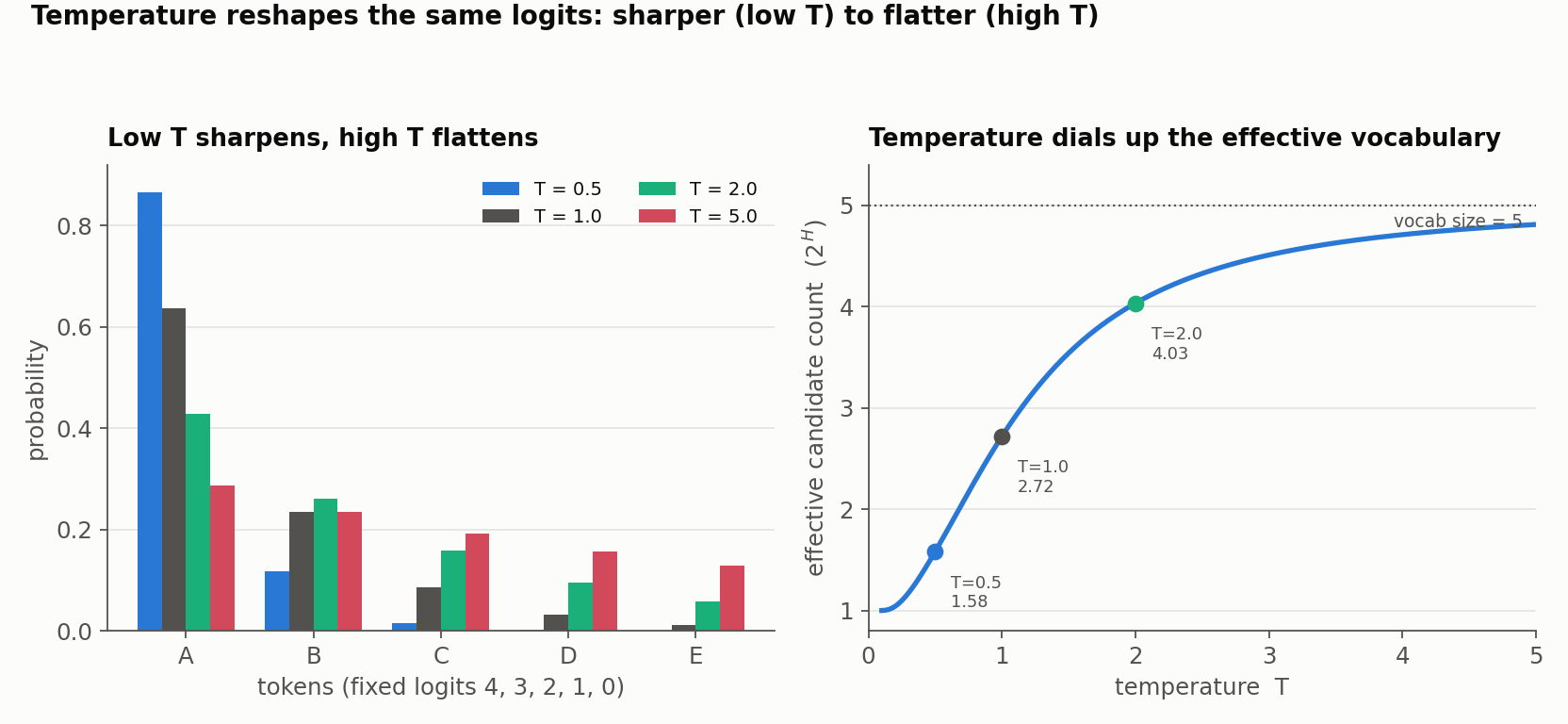
$T = 1.0$ (The Baseline): The equation is the standard Softmax, returning the model’s native distribution over tokens. “Native” is not a promise of calibration - it is simply the distribution the model produces before we distort it.
$T \to 0^{+}$ (The Greedy Spike): Dividing by a tiny positive number is equivalent to multiplying by a huge one, which exaggerates the differences between logits until the top-logit token absorbs almost all the mass. The distribution concentrates on the argmax. Note that $T=0$ exactly is undefined ($z_i/T$ divides by zero); APIs treat it as a convention, usually a shortcut for greedy decoding (and some simply forbid it).
$T \to \infty$ (The Flatline): Dividing by a massive number squashes all logits toward zero. Since $e^0 = 1$, every numerator becomes roughly equal and the distribution flattens toward uniform over the eligible tokens. That last phrase matters: tokens removed by a grammar, a safety rule, or a
-infmask stay out - temperature spreads mass over what is allowed, not over the entire dictionary.
A concrete five-token example
Abstractions like “sharpen” and “flatten” are easier to trust with real numbers. Take a fixed, transparent logit vector - $z = [4, 3, 2, 1, 0]$ for tokens A-E - and run the temperature-scaled softmax at three settings. (A quick engineering aside: always compute softmax in the numerically stable form $p_i(T) = \exp((z_i - z_{\max})/T) \big/ \sum_j \exp((z_j - z_{\max})/T)$. Subtracting the max changes nothing mathematically but prevents $\exp$ from overflowing, which matters a lot at low $T$.)
| Token | logit | $T=0.5$ | $T=1$ | $T=2$ |
|---|---|---|---|---|
| A | 4 | 0.865 | 0.636 | 0.429 |
| B | 3 | 0.117 | 0.234 | 0.260 |
| C | 2 | 0.016 | 0.086 | 0.158 |
| D | 1 | 0.002 | 0.032 | 0.096 |
| E | 0 | 0.000 | 0.012 | 0.058 |
| Entropy (bits) | 0.66 | 1.44 | 2.01 | |
| Effective candidate count ($2^{H}$) | 1.58 | 2.72 | 4.03 | |
| Top-p ($p=0.90$) set | $\{A,B\}$ | $\{A,B,C\}$ | $\{A,B,C,D\}$ |
Two summary numbers are worth naming. Entropy measures the spread of the distribution, and effective candidate count ($2^{H}$, the exponential of the entropy in bits) turns that into an intuitive “how many tokens are really in play.” At $T=0.5$ the distribution behaves like ~1.6 tokens; at $T=2$ like ~4. One caution: entropy is descriptive, not a quality score - higher is not inherently better, more creative, or more human. The right level depends entirely on the task.
Notice the bottom row: the top-p set grows from two tokens to four as temperature rises, even though $p$ never moved. That is the interaction the next section is about.
3. The Great Misconception: Does Temperature Change the Candidate Pool?
Here is where many practitioners get confused. If temperature flattens the curve, does it change the ranking of the tokens? Does it change which tokens the downstream samplers (Top-K or Top-P) are allowed to look at?
The short answer: It preserves the rank, but its effect on the candidate pool depends entirely on the sampling strategy we choose.
Because the exponential function is strictly monotonically increasing, dividing every logit by the same positive constant ($T$) never changes their relative ranking. If “Apple” had a higher logit than “Banana”, “Apple” will always have a higher probability than “Banana”, at any positive temperature. This is exactly why temperature alone cannot change the identity of the argmax.
One important assumption rides underneath everything below: the order in which processors are applied is implementation-specific. Different APIs compose temperature, penalties, top-k, top-p, min-p, and constraints in different sequences, and the results below assume temperature is applied before truncation with nothing reordering the tokens in between. A repetition penalty or a constraint applied first can change the ranking, and a different processor order can produce different output. With that caveat stated, here is how the two truncation strategies respond:
Scenario A: Top-K Sampling
In Top-K sampling, we isolate the $K$ tokens with the highest probabilities and ignore the rest.
- Does the pool change? NO (given the ordering assumption above).
- Because the rank order is preserved, the exact same $K$ tokens make up the candidate pool whether $T=0.1$ or $T=100$. Temperature only redistributes probability among those $K$ tokens; it doesn’t invite any new tokens in.
Scenario B: Top-P (Nucleus) Sampling
In Top-P sampling, we sort tokens by rank and include them until their cumulative probability reaches $P$ (e.g., $P = 0.90$).
- Does the pool change? YES, because temperature reshapes the cumulative masses even though it preserves the ranking.
- We already saw this quantitatively in the five-token table: at $p=0.90$ the nucleus grew from $\{A,B\}$ at $T=0.5$, to $\{A,B,C\}$ at $T=1$, to $\{A,B,C,D\}$ at $T=2$ - all with $p$ fixed.
- Pushed further: at very low $T$ the top token can hold ~95% of the mass, so the nucleus is a single token; at high $T$ the distribution is flat, so reaching 90% cumulative can require scooping up a large fraction of the vocabulary.
- Takeaway: higher temperature widens the nucleus, so it indirectly lets Nucleus Sampling consider more tokens.
4. The Final Roll of the Dice: Next Token Prediction
Once the sampling algorithm (Top-K or Top-P) has isolated the candidate pool and re-normalized their probabilities to sum to 1, the final step is random sampling. The model rolls a weighted polyhedral die to pick the winning token.
This is where the effect of temperature is felt in the generation:
- Low Temperature: The top token might hold a 99% weight in the pool, so the sampler picks it almost every time. The output is predictable and low-variance. Note the careful wording: low temperature makes text repeatable, not factual - a sharp distribution over the wrong token still confidently emits the wrong token.
- High Temperature: The weights inside the pool are leveled. If “Apple”, “Banana”, and “Cherry” now hold 34%, 33%, and 33%, the sampler is about equally likely to pick any of them, so lower-ranked tokens surface more often. This tends to read as more varied or surprising, and it also raises the chance of an off-topic or hallucinated continuation - but temperature only sets the distribution’s sharpness. “Creative,” “factual,” and “hallucinated” are properties of the resulting text that have to be measured, not guaranteed by a slider value.
5. One Confusing Overlap: Decoding Temperature vs. Calibration Temperature
The exact same $z_i/T$ math shows up in a completely different task, and it is worth separating the two so the names don’t mislead. Post-hoc temperature scaling is a standard technique for calibrating a classifier: after training, a single $T$ is fit on held-out data so the model’s confidence scores better match its actual accuracy. Same formula, opposite goal - calibration tunes $T$ once to make probabilities honest, whereas decoding temperature sets $T$ per request to make generation sharper or more varied. A decoding creativity control is not a calibration procedure.
6. Tuning and Reproducing Temperature Reliably
Because temperature interacts with everything else in the pipeline, “I set temperature to 0.7” is not a reproducible description of a run. A minimal checklist:
- Record the model and revision (behavior shifts across versions).
- Record every decoding parameter, not temperature alone (top-k, top-p, penalties, min-p, constraints, and their order).
- Fix the prompt/template and the random seed.
- Draw multiple samples - one generation cannot demonstrate a distributional effect.
- Note the backend and version wherever exact reproduction matters, since kernels, batching, and hardware can perturb results.
Conclusion
Temperature doesn’t make an LLM “smarter” or “dumber.” It is a single knob that reshapes the model’s score distribution before the dice are rolled - sharper at low $T$, flatter at high $T$ - while leaving the ranking untouched.
Understanding that, plus the way it ripples through downstream truncation (invisible to top-k’s membership, decisive for top-p’s), lets us move beyond sliding values until the text “looks good” and toward tuning generation deliberately - measuring the behavior we actually want rather than assuming a temperature value guarantees it.
Appendix: Code to reproduce the numbers
The fixed five-token example above is a few lines. Note the numerically stable softmax (subtract the max before exponentiating) and the fixed, transparent logit vector - no “power-law” simulation needed to see the effect.
1
2
3
4
5
6
7
8
9
10
11
12
13
14
15
16
17
18
19
20
21
import numpy as np

def softmax_T(logits, T):
    """Numerically stable temperature-scaled softmax."""
    T = max(T, 1e-6)                      # z/T is undefined at T = 0
    z = (logits - np.max(logits)) / T    # subtract max -> no exp overflow
    e = np.exp(z)
    return e / e.sum()

def entropy_bits(p):
    p = p[p > 0]
    return float(-(p * np.log2(p)).sum())

logits = np.array([4.0, 3.0, 2.0, 1.0, 0.0])   # tokens A..E
for T in (0.5, 1.0, 2.0):
    p = softmax_T(logits, T)
    H = entropy_bits(p)
    cum = np.cumsum(p)
    nucleus = int(np.searchsorted(cum, 0.90) + 1)   # top-p(0.90) set size
    print(f"T={T}: probs={np.round(p, 3)}  "
          f"entropy={H:.2f} bits  eff_N={2**H:.2f}  top-p(0.90)={nucleus} tokens")
Running it reproduces the table exactly (e.g. at $T=2$: entropy 2.01 bits, effective count 4.03, and a four-token nucleus). To see the distributional effect rather than a single draw, sample many times with a fixed seed and plot the observed frequencies against these probabilities - one sample can never demonstrate a distribution.