Practical Privacy on the Web: Reduce Exposure Without Giving Up the Internet
Choose privacy controls by what they actually change: browser requests, cross-site links, mobile permissions, and the use of data already collected.
- The invisible auction
- From campaign budget to publisher payment
- Who decides which ad gets served?
- The millisecond handshake
- Anatomy of an OpenRTB auction
- Campaign lifecycle inside a DSP
- Trusting the programmatic supply chain
- ML in the millisecond
- A real-time ad platform under a millisecond budget
- The data exhaust of a page load
- The post-cookie frontier
- Practical privacy on the web You are here
- Learning the win curve
- From win curve to bidding
- Floor-price optimization
- What did the ad actually cause?
Priya has followed the requests behind Wanderlust Weekly’s trekking page. She now understands that a visit can send context to several services, create identifiers, and contribute to records that outlive the page. Her next question is practical: how much of this can she reduce while still reading the news, buying boots, and using maps?
A useful guide has to work within ordinary online life, without promising invisibility after installing an extension.
Our goal is meaningful reduction of exposure with manageable inconvenience. We will choose controls by the information flow they change, test that important tasks still work, and distinguish actions on our device from requests that other organizations must honor.
This guide builds on the page-load investigation and the identity discussion, and needs no developer tools. Product behavior and legal availability vary. The linked official guidance was checked on 11 September 2026; menu labels may differ by device and version. Priya’s examples remain fictional.
1. Start with a Small, Explicit Goal
“More private” needs an object: private from whom, about what, and during which activity?
For ordinary browsing, three goals give us a useful starting point:
| Goal | A control that addresses it | A limit to remember |
|---|---|---|
| Leave less browsing history on a shared device | A private session, closed completely afterward | Sites and network operators may still observe activity |
| Reduce links between unrelated visits | Tracking protection, separated browsing contexts, fewer shared identifiers | Logging into the same account can reconnect activity |
| Reduce future use of information a business already holds | Account preferences, applicable opt-outs, and deletion requests | A local browser setting cannot erase a remote database |
These goals overlap, but each needs its own control. Clearing browser history does not submit a deletion request to a shop, and rejecting an advertising identifier leaves purchases made while logged into that shop visible to it.
For Priya, a reasonable starting goal is narrower than anonymity: reduce routine cross-site advertising links, keep casual reading separate from shopping accounts, and avoid granting apps unnecessary access. Her bank will still know which account she uses. A merchant will still need information to deliver the boots she orders.
A baseline we can maintain
We can begin with a short sequence, then use the rest of this article to understand its boundaries:
- Keep the browser and operating system updated, and review built-in tracking protection and third-party-cookie settings.
- Decline optional advertising purposes where that reflects our preference; enable Global Privacy Control where supported (section 6).
- Separate casual browsing from important logged-in activity when the extra context is manageable.
- Review mobile tracking permissions, advertising identifiers, and access to location, contacts, camera, and microphone.
- Add a carefully chosen content blocker if needed, then test the sites we rely on.
- Address existing accounts and broker records through their appropriate privacy channels.
We can adopt one layer at a time. A smaller configuration that we understand and maintain is easier to verify than several overlapping tools whose exceptions we cannot explain.
Protection from another person using the device comes from separate operating-system accounts and a device lock, rather than browser profiles. This guide focuses on routine commercial data exposure; a device controlled by an employer or another administrator presents a different trust boundary.
2. Use Private Browsing for Its Actual Job
Private browsing is useful when we want a temporary browsing session with less local persistence; the services the browser contacts still receive its requests.
In Chrome’s documented Incognito behavior, the session ends when all Incognito windows close. Chrome then removes the session’s cookies and site data and does not retain its browsing history. Downloads and saved bookmarks remain. Websites and organizations operating or managing the network may still observe activity within their respective capabilities.
Consider Priya comparing a gift in a private window. This can keep that session out of the ordinary browser history. If she signs into the merchant, however, the merchant sees an authenticated visit, and the login and any order placed through it outlast the window.
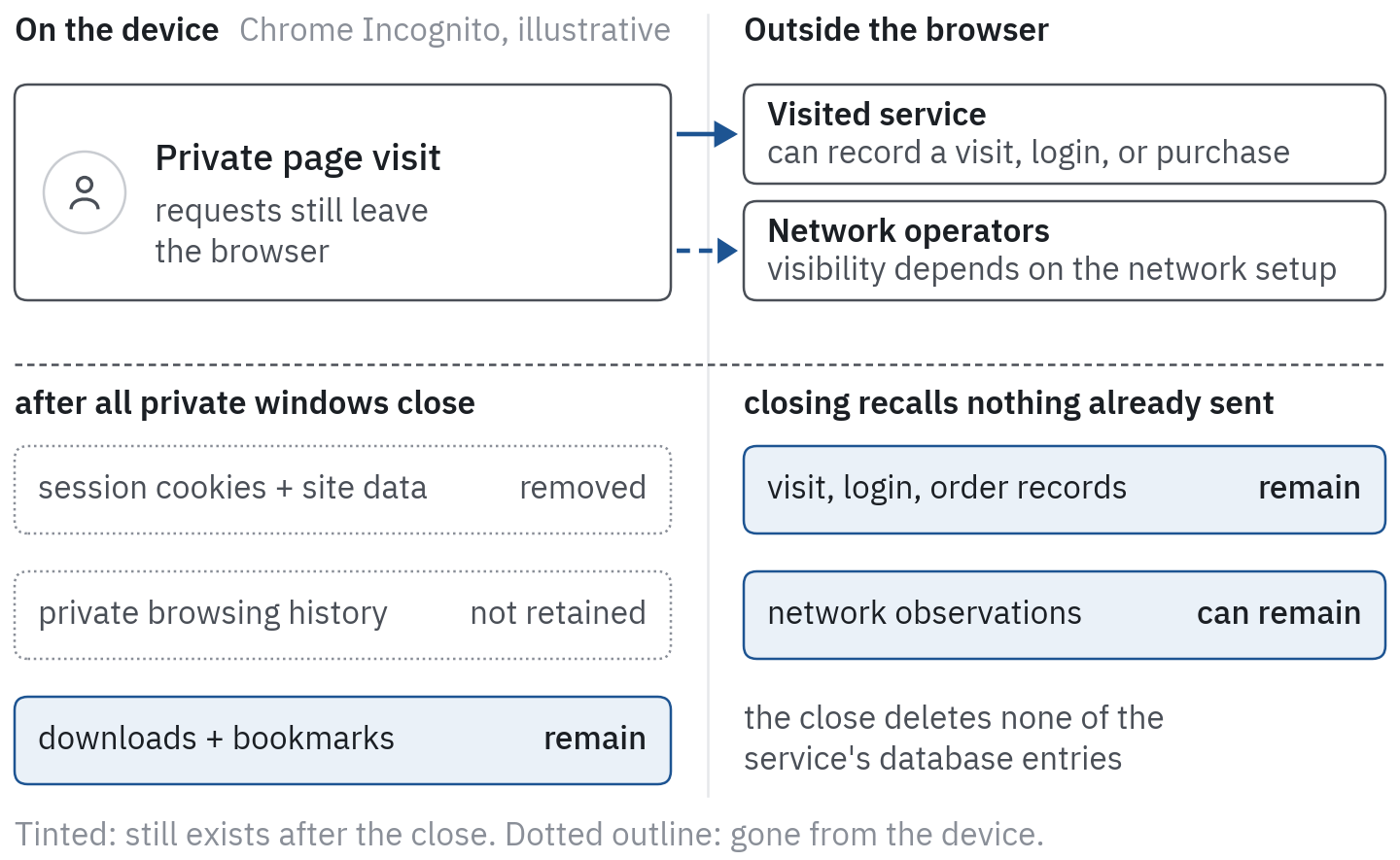 Figure 1. Closing a private session changes local persistence. It removes temporary browser state but does not recall information already received elsewhere, and saved downloads and bookmarks remain on the device.
We should also avoid treating a second private window as a guaranteed second identity. In Chrome, multiple Incognito windows belong to the same ongoing Incognito session. Other browsers have their own behavior, so the relevant unit is the documented session, not the number of windows on screen.
Network privacy is a separate problem
HTTPS protects application traffic in transit, but the destination still receives the request it serves. What a network observer sees varies with encrypted content, DNS configuration, proxies, managed-device software, and other details, so “the network can observe activity” does not mean every Wi-Fi operator can read every HTTPS page or password.
A VPN changes the network path and moves trust toward the VPN operator. Coverage matters: Mozilla’s Firefox privacy notice describes a browser VPN that proxies Firefox traffic, without covering other apps or making browsing fully anonymous. Cookies, account logins, and a page explicitly sending its own URL to an analytics endpoint all work through a VPN, so a VPN alone leaves most of the mechanisms that link advertising across visits in place.
We can assess a private session by checking its local behavior after closing it. An empty browser history says nothing about whether a merchant deleted an account record (section 7).
3. Separate Contexts, Then Watch for the Bridges
Browser profiles let us organize activity into separate contexts. Chrome’s profile documentation describes separate histories, passwords, bookmarks, and settings, and warns that profiles are not a barrier against someone else with access to the device.
For our example, Priya creates two clearly named profiles:
- Reading: general browsing, without routinely signing into shopping or social accounts.
- Accounts: banking, purchases, and services where authentication is necessary.
The purpose is to reduce accidental reuse of browser state and logins between activities. The separation is useful only if the workflow maintains it. We should check which profile opens links from email and other apps rather than assume they always land in the intended context.
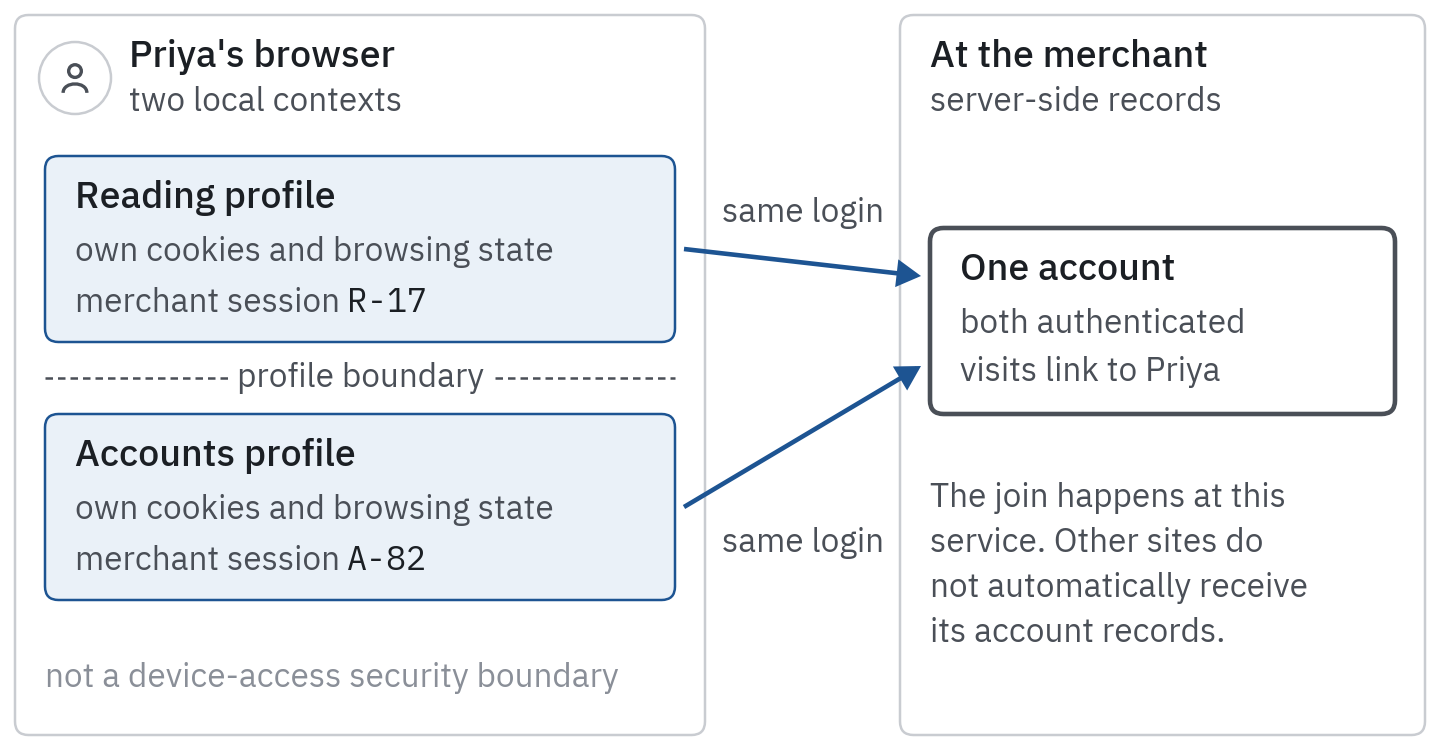 Figure 2. A shared login can bridge separate browser profiles. Profiles separate browser contexts; a shared login can connect observations at the service. That connection does not give every other website access to the account’s records.
Suppose Priya signs into the same merchant account in both profiles. That merchant can associate both authenticated sessions with the account. The profiles still have separate local contexts; the join happens at the server. Shared contact details or other supplied identifiers can create additional connections where recipients have access to them.
Profiles remain useful: they reduce a specific kind of accidental continuity, without promising unlinkability against every signal, account relationship, or recipient.
Email aliases reduce unnecessary address reuse
An email-forwarding alias can give a newsletter or shop a different address from the primary inbox address. For example, Mozilla’s Relay documentation describes masks that forward messages to an existing inbox.
Different aliases can reduce direct matching on an identical email address across services and make unwanted messages easier to isolate. Reusing one alias everywhere recreates a shared identifier. An alias covers only the email address: a delivery address, payment relationship, or other identifier we provide stays visible, and the forwarding service becomes another trusted party.
Account recovery deserves deliberate handling. Store the account-to-alias relationship in the password manager, and keep an alias active while it is needed for login or recovery. Deleting a Relay mask, for example, stops forwarding and cannot be reversed. Disabling an unwanted newsletter’s forwarding and deleting the address used to recover a bank account have very different consequences.
The goal is useful separation that we can still manage, rather than an elaborate collection of identities.
4. Block at the Right Layer
Browser tracking protection, content blockers, and DNS blocking intervene at different points. Their counters should not be added together as if they measured unique companies prevented from collecting data.
Begin with browser protections
Built-in protections are a sensible first layer because they are maintained with the browser and provide a place to inspect exceptions. Firefox’s Total Cookie Protection separates cookie state by the site being visited. Safari exposes cross-site tracking controls. Chrome exposes third-party-cookie controls, with third-party cookies blocked by default in its documented Incognito mode.
Blocking and partitioning differ. Blocking can prevent access to particular state; partitioning can allow separate state in different site contexts, the mechanism our page-load article describes. Neither means every request is blocked or every recipient has stopped collecting page context. The browser and settings determine the actual behavior, and that behavior changes over time.
For Priya, the practical step is to review the browser’s current privacy settings and its existing site exceptions. If stronger protection is available, enable it and test important tasks before making broad exceptions.
Content blockers can make more selective decisions
A browser content blocker may filter requests using URL patterns, resource types, or page context, depending on the extension’s capabilities and permissions. Some also hide page elements. Hiding an element does not necessarily mean the corresponding request was prevented.
Choose a maintained blocker from its genuine publisher and the browser’s official extension channel. Review requested access and documentation before installation. Tools operating on web pages can need substantial access themselves, so several overlapping blockers multiply that access without necessarily improving privacy. The uBlock Origin project’s blocking-mode documentation illustrates how stronger modes increase both intervention and troubleshooting requirements; supported editions and capabilities vary by browser.
DNS filtering is coarser
A DNS blocker intervenes when a device asks its configured resolver to resolve a hostname. Pi-hole’s blocking documentation describes ways to answer blocked lookups. This can cover more than one browser when the relevant devices and apps actually use that resolver.
It cannot ordinarily distinguish these two HTTPS paths through DNS alone:
https://service.example/checkouthttps://service.example/analytics
Both use the hostname service.example. A DNS rule against that name can affect both. A browser request filter with the relevant capability can distinguish URL paths before the browser encrypts and sends the request. A particular path rule still needs testing: real services can mix purposes in one endpoint or require dependencies we have not identified.
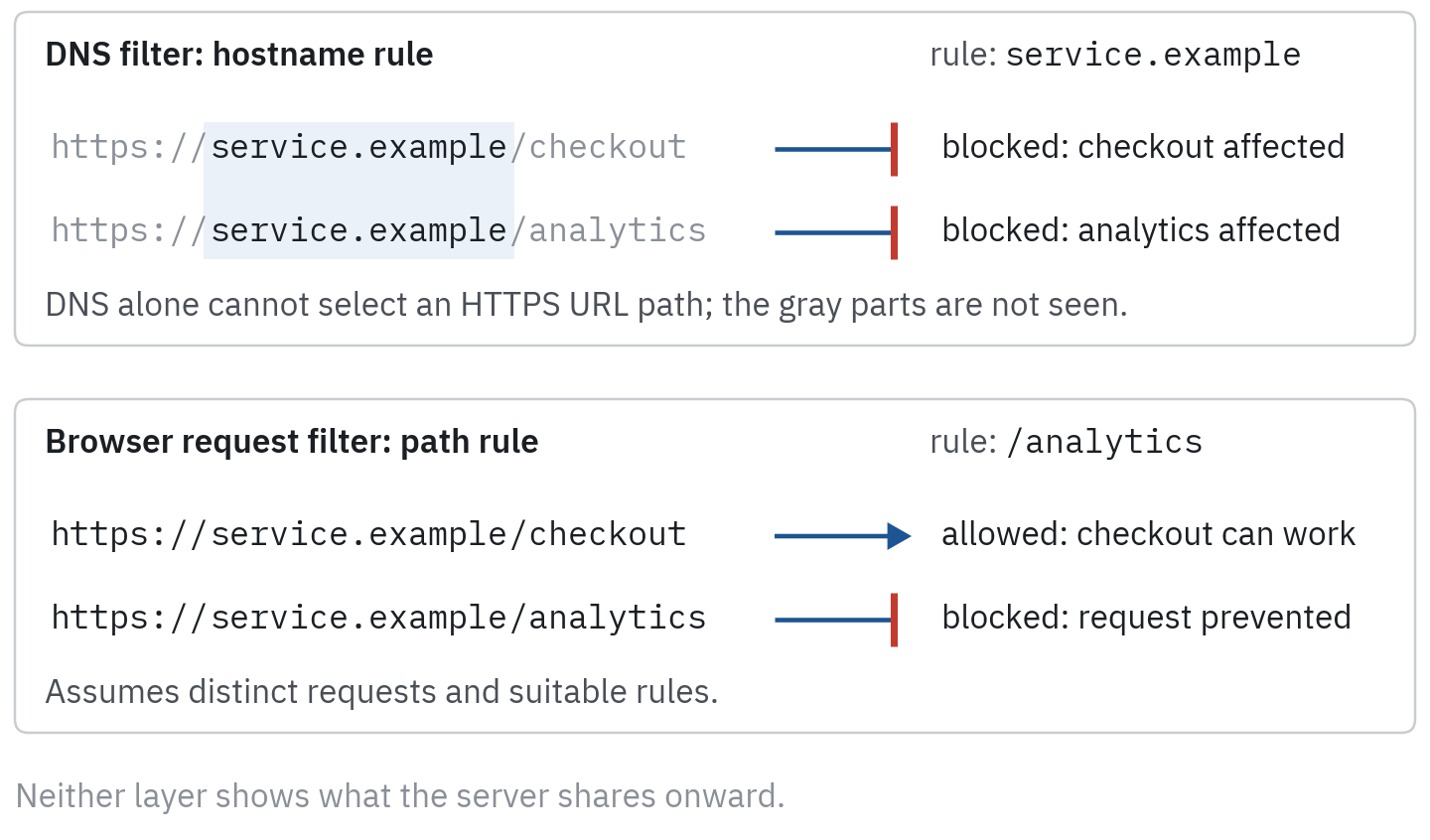 Figure 3. The filtering layer determines what can be distinguished. Filtering precision depends on where the control acts. A DNS rule operates on the hostname; the browser can have enough information to distinguish requests within that host.
DNS filtering also depends on the actual resolution path. Another resolver, a VPN configuration, cached information, or other connection behavior can change whether the filter participates. A dashboard showing blocked lookups is evidence about that resolver’s activity, not complete coverage of the device.
For most readers, DNS filtering is an optional additional layer. It is most useful when we can explain which devices use it and can maintain exceptions without breaking the household’s essential services.
5. On Mobile, Review Capabilities Separately
An app’s tracking permission, access to precise location, and ability to associate an order with an account are different capabilities, and turning off one leaves the others in place.
iPhone and iPad
Review Settings → Privacy & Security → Tracking. Apple’s tracking-permission guidance explains individual app choices and the switch controlling whether apps may ask to track. Apple’s developer policy requires permission for tracking across other companies’ apps and websites or accessing the advertising identifier, which reads as all zeros without that permission, and prohibits fingerprinting to identify a device or user.
That is a platform rule and control, not proof that an app makes no network requests or collects no first-party information. A shop can still need account and order information to provide its service. Camera, microphone, contacts, and location permissions need their own review.
Apple’s App Privacy Report is useful evidence after it is enabled: it reports recent sensor access and contacted domains, with one stated limit: it does not include network activity from private browsing sessions in browser apps. It shows destinations rather than the contents of each request or what recipients do afterward. An unfamiliar domain is a lead to investigate, not sufficient evidence of misuse.
Android
Use the device’s app-permission controls or permission manager to review access by app and capability. Google’s Android guidance describes available choices, including restricting certain permissions to use of the app. Prefer approximate location when it is sufficient, and grant background access only when it serves a feature we actually want.
On supported devices, deleting the advertising ID removes that particular identifier; Google’s documentation says attempts to obtain it then receive zeros. Resetting is a different operation: it creates a new identifier. Search device settings for “advertising ID” because menu placement varies.
Review other Android ad-privacy controls and the relevant account’s advertising preferences separately. An app’s login, its own identifiers, and data already supplied to its servers all survive removal of the advertising ID.
Match permission to the task
For Priya’s trekking app, location while navigating a trail may be useful. Continuous background location when she only reads route descriptions deserves a different decision. An app used to scan a receipt may need camera access during scanning, without needing the contact list.
Test the intended feature after changing permission. If it stops working, check whether narrower access is sufficient before restoring every requested permission. Uninstalling an unused app reduces its opportunity to run on the device, but deleting an account or server-held records remains a separate action.
6. Send a Preference Without Mistaking It for a Firewall
Global Privacy Control (GPC) communicates a request concerning the sale or sharing of personal information and certain cross-context advertising uses. It is a signal to recipients, not a mechanism that technically blocks every collection request.
The W3C GPC specification, currently a Working Draft, describes how the preference travels. Its legal effect depends on the applicable framework, and even where recognized it concerns sale, sharing, and certain advertising uses rather than deletion or every use of information within a service. We should also distinguish GPC from the similarly abbreviated GPP: GPP, the Global Privacy Protocol, is the advertising ecosystem’s transport for various privacy signals, discussed in the page-load article.
In a supporting browser, enable the GPC preference in privacy settings. Firefox’s official instructions use the option labeled “Tell websites not to sell or share my data.” Review each browser and device we use, because changing one leaves the others as they were.
Where the law recognizes it, the signal has consequences beyond a courtesy request. For example, the California Attorney General’s CCPA guidance explains that covered businesses must honor GPC as a valid opt-out of sale or sharing for applicable consumers. That obligation comes from California law; readers elsewhere depend on the rules where they live.
We can combine GPC with technical protection: one limits certain requests or state access, while the other communicates an applicable preference to services we still contact. An account’s own advertising settings and a site’s optional-purpose choices address additional parts of the relationship.
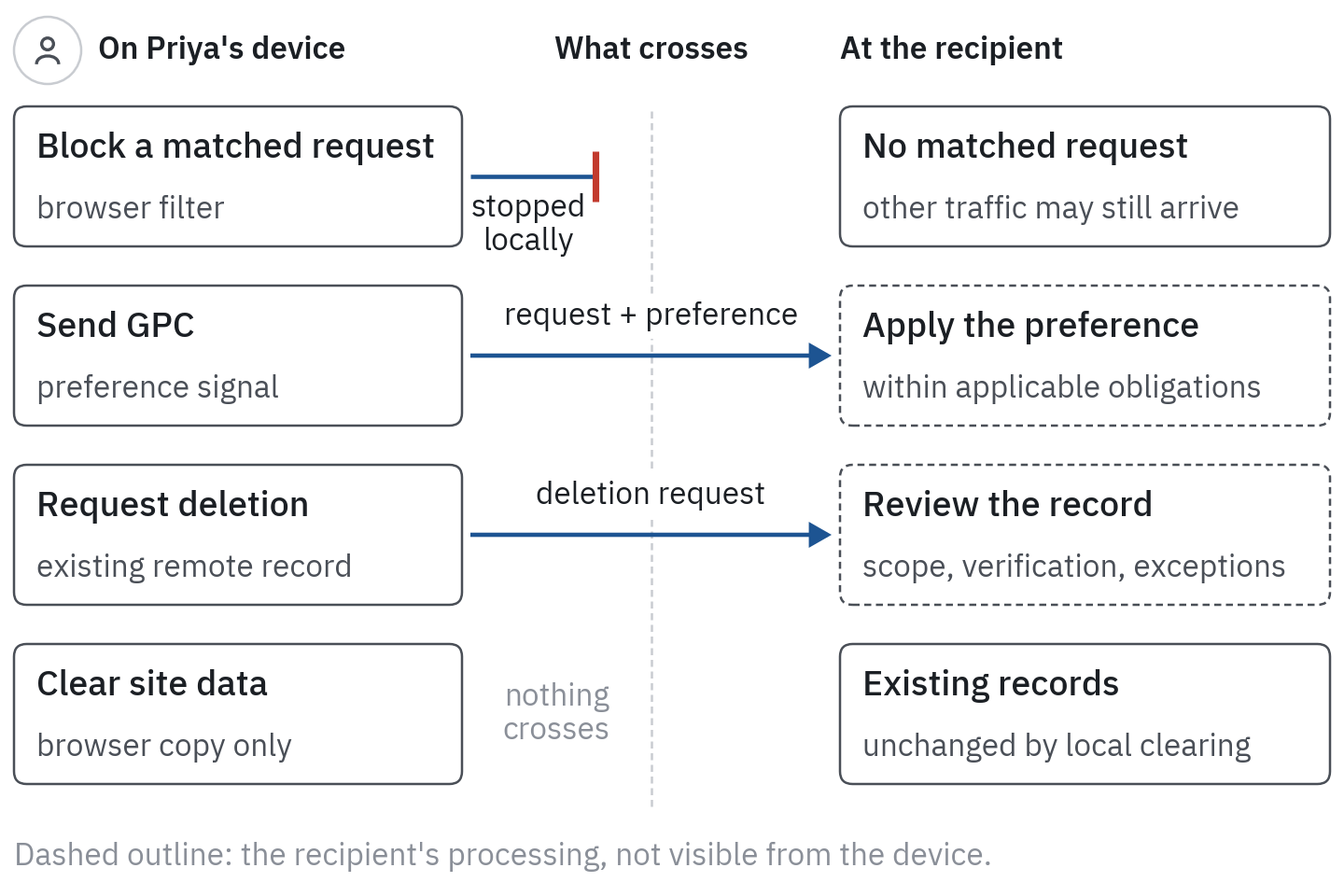 Figure 4. Prevention, preference, and deletion act in different places. Each operates on a different part of the data flow. Sending a request or preference does not itself demonstrate that remote processing has changed, so we verify the response and its scope.
Clearing site data can also remove saved privacy choices and sign us out. After doing so, check the site’s resulting state instead of assuming an earlier rejection remains recorded locally.
A retained choice cookie shows that a choice was recorded, and a message saying that a preference was honored is useful evidence of the site’s response; neither exposes the site’s databases, its onward transfers, or whether every recipient honors the choice. We can verify the browser signal and visible behavior, but stronger claims about backend compliance require other evidence.
7. Treat Existing Data as a Separate Task
A browser change mainly affects activity from that point forward. Existing account records, broker profiles, and previously shared copies require a different process.
First identify the service and the desired outcome. We may want access to information, correction of an inaccurate record, an advertising opt-out, withdrawal of consent, or deletion. These requests have different scopes. Unsubscribing from marketing email can leave a customer account in place, and closing an account can leave records retained for a permitted purpose.
Rights depend on the jurisdiction, the organization, the processing, and the rules in force. The European Commission’s explanation of individual rights describes access, objection, and erasure under the GDPR, including conditions and exceptions. A receipt, fraud-prevention record, or record needed for a legal obligation may need treatment different from an optional advertising profile. We should ask what was removed, what remains, and on what basis, rather than equate a generic confirmation with deletion of every copy.
For readers in India, implementation dates deserve particular care. The government’s DPDP Act commencement notification of November 2025 phases provisions into force. Sections 11 to 15, the rights and duties of data principals (access, correction and erasure, grievance redressal, and nomination), commence eighteen months after publication, in May 2027, along with most of the Act’s other substantive obligations. Until then, those rights are not yet operational, even though the Act and Rules have been published. Check current official guidance and the service’s available privacy process for the specific request.
Data brokers and removal services
Start with a broker’s verified privacy channel or an official centralized mechanism where available. California’s Delete Request and Opt-out Platform, DROP, provides an eligible California resident with a way to submit a request across registered brokers. Its current schedule requires brokers to access the platform at least every 45 days beginning August 1, 2026, and the platform says a status update can take up to 90 days. It is not a worldwide request to every database.
A paid removal service can reduce administrative effort, but it becomes another recipient of identifying information. Before paying, examine its coverage, required information, rechecking process, cancellation terms, and treatment of data it collects. A quoted number of supported brokers does not establish successful removal of a particular record.
Keep a small request log: organization, verified contact, request type, date, identifier used for matching, confirmation, and unresolved questions. Provide information proportionate to the verification needed; do not send identity documents to an unverified address simply because a message promises removal.
If a response is incomplete, follow the applicable appeal or regulator process rather than repeatedly submitting the same form without tracking the result. Removal can also need follow-up if records are reacquired from another source. A recurring check is more informative than a permanent “clean” score.
8. Repair Breakage Narrowly and Measure Modestly
Privacy controls sometimes interrupt sign-in, payment, embedded video, maps, or comment systems. Breakage alone shows neither that the control was wrong nor that the broken component was malicious: a shared dependency can serve several purposes.
Suppose Wanderlust Weekly loads normally, but Priya’s merchant checkout stalls after she tightens blocking. We can diagnose it without disabling protection for the whole browser:
- Record which task failed and whether a payment may already have been submitted. Do not repeatedly retry an uncertain transaction.
- Inspect the browser or blocker’s site-specific report for relevant blocked resources.
- Change one narrowly scoped setting or exception, then reload the affected page and test the task.
- Keep only the exception that is needed, or use a separate account profile for that service if that is easier to maintain.
- Revisit the exception after updates and remove it when it is no longer necessary.
Firefox’s compatibility guidance illustrates why browsers sometimes allow limited exceptions to preserve functionality. A site-level exception restores access only within the scope of that control; inspect the scope instead of assuming it is temporary or restricted to a single script.
The DNS example gives us a concrete failure mode. Blocking all of service.example prevented both /analytics and /checkout. If a supported browser rule can block only the analytics request and checkout still works, it offers a narrower intervention. If both purposes share one request, any separation has to come from the application itself.
A useful success test
For Priya’s routine, success might mean that article reading, bank login, and checkout still work; optional location and tracking access are reduced; her reading profile remains signed out of shopping accounts; and a known advertising request no longer leaves the browser under the tested conditions.
Ads may still appear, because contextual advertising can work without a cross-site profile. And a drop from twenty requests to ten does not mean “50% more privacy”: the ten remaining requests may contain more sensitive information than the twenty they replaced.
For a closer investigation, repeat a small set of tasks before and after a change, with the same browser state, privacy choice, and observation window. Use the page-load audit procedure to inspect destinations and payloads. Label what is observed, what is inferred, and what remains unknown. Keep screenshots or exports free of unnecessary account and session information before sharing them.
A maintainable setup has an explanation for each exception, instead of a dozen mysterious switches changed during troubleshooting months ago.
9. Personal Controls Help; System Design Still Determines the Ceiling
We can now choose a control by its job. Private sessions reduce local persistence. Profiles reduce accidental context mixing. Browser and network filters intervene in selected requests or state access. Mobile permissions constrain particular capabilities. Aliases reduce unnecessary address reuse. GPC and account preferences communicate choices, while applicable rights processes address information held elsewhere.
That is meaningful progress, even though no single tool makes Priya anonymous. A person who cannot maintain these controls has not thereby consented to every possible downstream use.
The limits are structural. A publisher decides which vendors execute code in its page and which data the integration sends. A platform decides how account activity is linked, which permissions exist, and what defaults people inherit. Recipients determine retention, access, and onward processing, subject to their obligations and enforcement. Regulators and institutions can address conduct that a browser preference cannot inspect or prevent by itself.
Responsible engineering can reduce the burden before it reaches the reader: minimize identifiers and sensitive URLs, separate optional collection from essential functions, honor choices consistently, make retention finite, and design useful services that work without broad cross-context profiling. An interface that offers a rejection button while routing around its meaning is not repaired by asking people to become better settings administrators.
For our series, the practical outcome is a habit of asking where a control acts and what evidence supports its effect. The next article returns to bidding under incomplete information. The privacy constraints now have a concrete human meaning: a buyer’s missing signal may represent an intentional boundary, and building a useful model does not confer permission to remove it.
Resources
Browsers and private sessions
- Google, Chrome Incognito and Chrome profiles: what a private session and a profile do and do not separate (sections 2 and 3).
- Mozilla, Firefox privacy notice: the scope of Firefox’s built-in VPN (section 2).
- Mozilla, Total Cookie Protection and tracking-protection exceptions; Apple, Safari cross-site tracking controls (sections 4 and 8).
- uBlock Origin blocking modes and Pi-hole blocking modes: request-level and DNS-level filtering (section 4).
- Mozilla, Firefox Relay masks and deleting a mask: email aliases and their recovery consequences (section 3).
Mobile
- Apple, app tracking permissions, App Privacy Report, and user privacy and data use (section 5).
- Google, Android app permissions, advertising ID, and Android ad privacy (section 5).
Signals and rights
- W3C, Global Privacy Control, and Mozilla, enabling GPC in Firefox (section 6).
- California Attorney General, CCPA, and California Privacy Protection Agency, DROP: GPC as an opt-out, and broker deletion requests (sections 6 and 7).
- European Commission, rights for individuals, and MeitY, DPDP Act commencement notification: GDPR rights and India’s phased commencement (section 7).